On this page, you can freely combine equipment and check their performance.
Creating an Equipment Build
This section explains the process of creating an equipment build by setting equipment, drift skills, and style boosts.
In the build area, you select weapons and armor to create your equipment build.
Based on your selections, skills and expected damage values are calculated automatically.
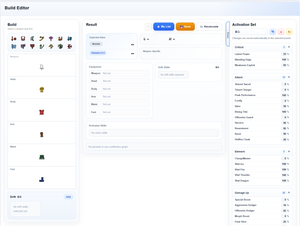
Basic Operations
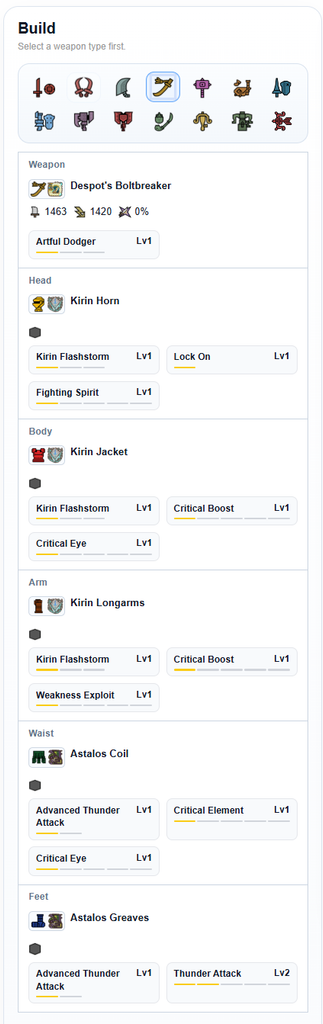
1. Select a weapon type from the icons at the top
2. Select a weapon from the "Weapon" slot
3. Select armor for each slot (Head, Chest, Arms, Waist, Legs)
4. Once set, the results are updated automatically
※ You need to select a weapon type before selecting a weapon.
After setting your equipment, adjust drift skills and style boosts as needed.
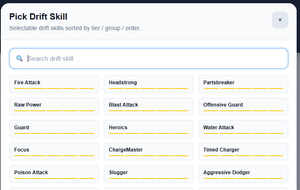
Drift Skill Settings
In the "Drift" area at the bottom of the screen, you can add drift skills.
You can select skills from the "Add" button, and search is also available.
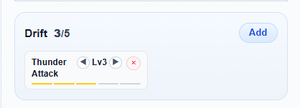
You can change the skill level in the following ways:
- Use the ◀ ▶ buttons to adjust
- Click the level bar below the skill to change it
Style Boost (Supported Weapons Only)
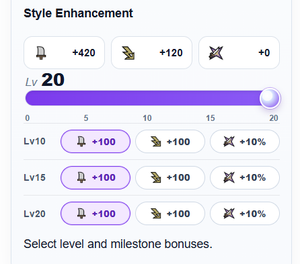
You can configure this by selecting a weapon that supports Style Boost.
- Set the Style Boost level
- Select parameters at Lv10 / Lv15 / Lv20
The boosted values will be displayed based on the selected parameters.
When you create an equipment build, the calculation results will be displayed in this area.
You can check expected damage values and skill configurations, and compare the performance of different builds.
※ It is recommended to first compare the "Expected Damage" values
About Expected Damage
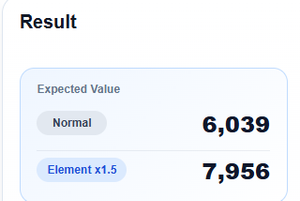
This is an indicator that shows the damage efficiency of the equipment build.
- Normal: Expected damage under normal conditions
- Element 1.5x: Expected damage against monsters where elemental damage is increased by 1.5x
👉 If you are assuming a target monster for elemental weapons, please also refer to "Element 1.5x"
Buttons
- Graph icon: Opens a screen where expected damage can be calculated in a time-based chart format
- My List: Saves the build, activation rates, and Style Boost settings (Lv / milestone) to your personal list
※ This data is saved locally for each user - Save: Saves the build to the server. The saved data includes the equipment build and drift skills
Even if the order of drift settings differs, builds with the same skill and level combinations are treated as the same - Recalculate: In most cases, recalculation is performed automatically when values are changed, but if it does not update properly, press this button
Screenshot Mode
When viewing on a smartphone or similar device, a camera icon will be displayed.
Pressing this button switches to a screen where you can easily export your build and expected damage as an image.
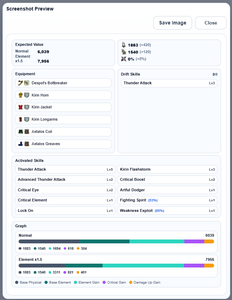
■ If image saving does not work
This feature saves the currently displayed screen as an image.
Depending on your device or browser, it may not work correctly.
Please check the following:
- On iPhone / iPad, the image may open in a new screen (press and hold to save)
- If popup blocking is enabled, the save screen may not open
- Ad blockers or content blockers may affect the function
- Please run after the page has fully loaded
If saving does not work, please use your device’s screenshot function.
Weapon Status

The weapon's base stats (final values including Style Boost) are displayed.
- Attack
- Element
- Affinity
The values shown as “(+○○)” indicate the increase from Style Boost.
Weapon-Specific (Supported Weapons Only)
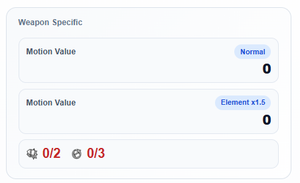
Some weapons display their own unique expected damage values.
Supported weapons:
- Gunlance
- Switch Axe
- Light Bowgun / Heavy Bowgun
- Bow
👉 Weapon-specific calculation results are displayed in this area.
Equipment List
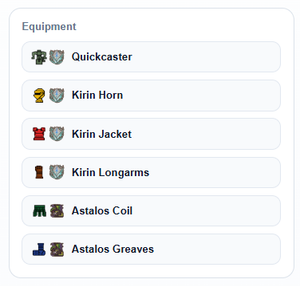
The currently selected equipment is displayed in a list.
Use this to review your equipment build.
Drift Skills
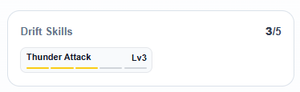
The configured drift skills are displayed.
The “(x/x)” indicator at the top right shows how many drift slots are being used.
Active Skills
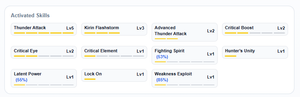
The currently active skills are displayed.
- Skill name
- Level
- Activation rate (for skills where the activation rate can be adjusted, the configured rate is shown)
👉 You can check the combination of skills activated in this build.
Damage Breakdown (Detailed Analysis)
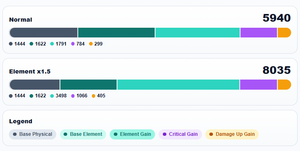
※ This feature is intended for users who want detailed analysis
The breakdown of expected damage is displayed as a graph.
The following categories are shown by color in the graph legend:
- Base physical damage
- Base elemental damage
- Additional elemental damage
- Critical damage bonus
- Damage multiplier bonus
👉 You can see which factors are contributing to the damage.
You can set how often each skill activates.
In actual gameplay, skills do not always activate, so by adjusting the activation rate, you can calculate expected damage values that are closer to real conditions.
The configured activation rates are automatically reflected in the expected damage calculation.
※ In most cases, the default settings are sufficient
Activation Rate Sets (Presets)
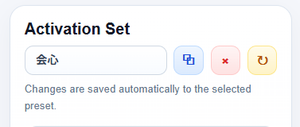
Activation rates can be saved as presets and switched as needed.
- Press the copy button and enter a set name to create a new preset
- You can create multiple presets
- Switching presets allows you to change activation rates all at once
- When you change activation rates, they are automatically saved to the currently selected preset
👉 Useful for comparing different conditions (e.g., always active vs. conditional activation)
Skill Groups
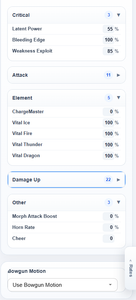
Skills are grouped by category.
By expanding each group, you can view the activation rates of the skills within that category.
- Affinity
- Attack
- Element
- Damage Up
- Others
Each group can be expanded or collapsed by clicking the ▶ icon.
How to Change Activation Rates
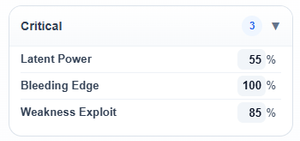
You can adjust activation rates by changing the values displayed on the right side of each skill.
- Can be set within a range of 0% to 100%
- Set individually for each skill
- Some skills use special input formats (e.g., Hunting Horn)
👉 Set the values based on how often you expect each skill to activate during actual gameplay.
Bowgun Adjustments
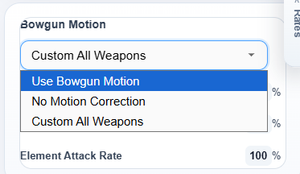
You can configure adjustments when using bowguns.
- Use Bowgun Adjustments: Apply preset adjustments for each weapon
- No Adjustments: Calculate without any adjustments
- All Weapon Custom: Set custom adjustment values (advanced setting)
Custom Adjustments (All Weapon Custom)
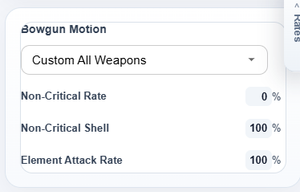
When selecting "All Weapon Custom", you can freely configure the following values:
- Non-critical rate: The ratio of shots that do not crit (e.g., explosions from Sticky Ammo, elemental ammo)
- Non-critical damage application rate: The ratio of shots where damage modifiers apply within the above category
- Elemental damage rate: Normally calculated at 100%. Lower this value when using elemental bowguns that include non-elemental components
👉 In most cases, the default "Use Bowgun Adjustments" setting is sufficient.
※ These settings can also be adjusted for other weapons that include non-critical attacks.